
- Sort the worklist by hand
- Ping the radiologist, then ping again
- Search for priors across systems
- Chase the overdue read
- Copy the report back into PACS
- Repeat at 2am
SkiaManager · The operations layer
Stop being the human router.
SkiaManager runs the coordination work around reporting. Assignment, notification, prior context, and direct submit back to your PACS, all on their own.
Arrival to PACS without a single manual step. The coordination your team does all day, running on its own.
- Zero manual reminders
- Alerts where your team already is
- Direct submit to PACS
- Live within 48 hours
01Why this exists
Managers spend the day chasing work
Assignments, reminders, pending studies, report status, critical alerts. The work keeps moving only because someone keeps watching. That someone is usually you.
None of it is reporting. It is the coordination around reporting, and it scales with volume. Add studies and you add sorting, chasing, and follow ups.
SkiaManager takes the coordination off your desk. Studies route themselves, the right people get notified, prior context is waiting, and finished reports go straight back to your PACS.
- Auto The worklist sorts itself
- Auto The radiologist is alerted the moment it lands
- Auto Priors arrive attached and summarized
- Auto Anything overdue escalates on its own
- Auto Reports submit straight to PACS
- Auto You sleep at 2am
Radiologists spend roughly half their working time actually interpreting. The rest goes to interruptions and coordination (JACR, 2022). The coordination is what SkiaManager takes.
02What it does
The coordination runs on its own
Every step between a study arriving and a report leaving, handled without someone watching the queue.
Auto assignment
Studies route to the right radiologist by modality, subspecialty, and availability. No one sorts the worklist by hand.
Notify on assign
Radiologists are alerted the moment a study is assigned, and managers are alerted on critical findings. No manual reminders.
Auto history summary
Prior reports are pulled in and summarized automatically, so there is full clinical context before anyone starts typing.
Auto comparison fetch
The right prior study is surfaced for comparison without searching across windows for it.
Worklist sync
Studies appear the moment they arrive. No manual refresh, no checking multiple systems. Your queue is always current.
Direct submit to PACS
Reports go straight back to your PACS on submit. No delay, no copy paste, no transcription between systems.
03Notifications
The right alert reaches the right person
Distributed teams do not sit in a worklist app all day. Alerts find your radiologists where they already are, so nothing waits to be noticed.
-
New study alerts
Radiologists know the moment a study lands in their queue, so nothing sits unread waiting to be noticed.
-
Critical finding alerts
Managers are notified the instant a critical finding is reported, so urgent results never move at the speed of email.
-
QA and error alerts
Quality flags route to the people accountable for them, so you have visibility without reading behind every radiologist.
-
On your channels
Email, WhatsApp, Telegram, Slack, and Messages. Fully customizable, so the right information reaches the right person without overload.
Urgent results never move at the speed of email.
Failures to communicate results are among the most common causes of radiology malpractice claims (JACR). The costliest failures are not misreads. They are messages that never arrived.
04What changes
The work runs without being watched
No one sorts worklists. No one chases assignments. It just runs.
- Arrives
- Assigned
- Notified
- Priors attached
- Read
- In PACS
From the moment a study arrives to the moment its report is in your PACS, nobody touches the workflow.
- Auto
- Assignment and routing
- Instant
- Critical finding alerts
- Direct
- Submit back to PACS
- Zero
- Manual reminders to send
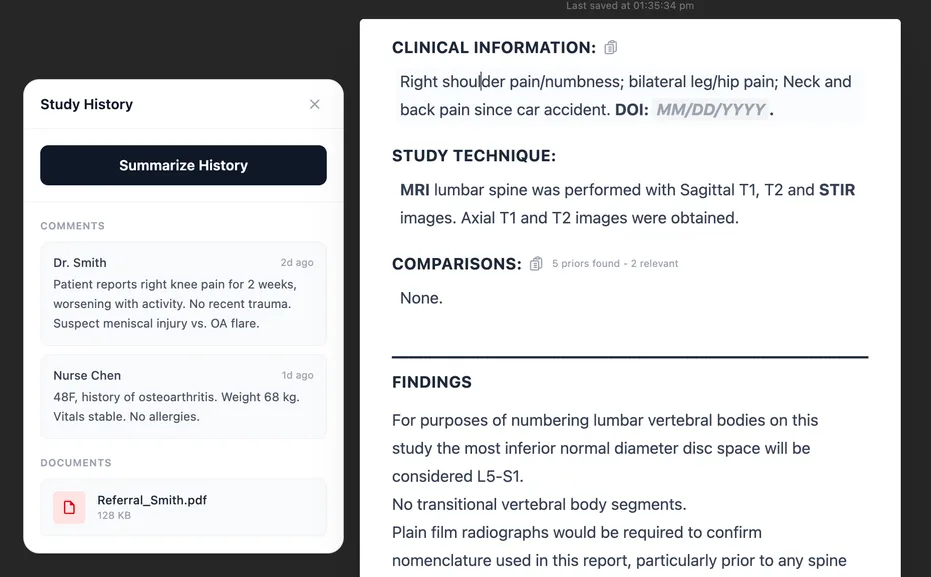
The radiologist opens the study already knowing the patient. Priors pulled, history summarized, before the read starts.
05For the person reading this at 11pm
The work keeps moving because someone keeps watching.
It stops having to be you.
Add studies today and you add sorting, chasing, and follow ups. The coordination scales with volume, and it all runs through you. SkiaManager breaks that link: studies route themselves, the right people get told, and finished reports land back in your PACS.
Your volume can grow without your evenings shrinking. No one sorts worklists. No one chases assignments. It just runs.
06Common questions
Asked by every radiology team we meet
How does auto assignment decide who gets a study?
Studies route by modality, subspecialty, and availability. The logic is plain and configurable, so the right radiologist gets the right study without anyone sorting a worklist by hand.
Which notification channels are supported?
Email, WhatsApp, Telegram, Slack, and Messages. Fully customizable per person and per event, so the right information reaches the right person without overload.
Does SkiaManager replace our PACS or RIS?
No. It runs the coordination around them. Studies sync in from your existing systems and finished reports go straight back to your PACS on submit. Nothing about your imaging stack changes.
What happens when a critical finding is reported?
Managers are notified the instant a critical finding is reported, on the channels they choose. Urgent results never move at the speed of email.
Where does patient data go?
Your data never leaves your PACS. Skia stores zero patient data.
Can we use SkiaManager on its own?
Yes. SkiaManager works standalone. Assignment, notifications, priors, and direct submit to PACS all run without SkiaReporter or SkiaQA. Start with coordination alone and add the rest of Skia when you are ready.
How long does it take to go live?
No setup fees, no IT project, no training required. Most teams are live within 48 hours.
07Further reading
Go deeper on the problems this solves
Teleradiology worklist management that keeps queues moving
Improve teleradiology worklist management with better routing, faster visibility, and cleaner escalation so studies move quickly without constant supervision.
Read articleHow to reduce radiology turnaround time step by step
Learn how to reduce radiology turnaround time by breaking delays into segments, fixing coordination waste, and smoothing report delivery end to end reliably.
Read articleNighthawk radiology: how overnight prelim reads work
A practical guide to nighthawk radiology covering overnight prelim workflows, QA, turnaround, escalation, provider oversight, and cleaner morning handoffs.
Read articleCritical findings in radiology: notification that closes the loop
How to handle critical findings in radiology with notification paths that close the loop every time: escalation, alerting, ownership, and documentation.
Read articlePACS Integration for Reporting Tools: What Radiology Managers Need to Know
PACS integration is the biggest anxiety point when adopting a new radiology reporting tool. What the process involves, what to ask, and the timeline to expect.
Read article08The rest of Skia
SkiaManager works standalone. Nothing here is required. Add either product when you are ready.
See your own worklist run itself
No setup fees, no IT project, no training required. Most teams are live within 48 hours.